Bring meetings, customer follow-ups and business activity into one connected calendar so the people, companies and deals behind every event stay close by.
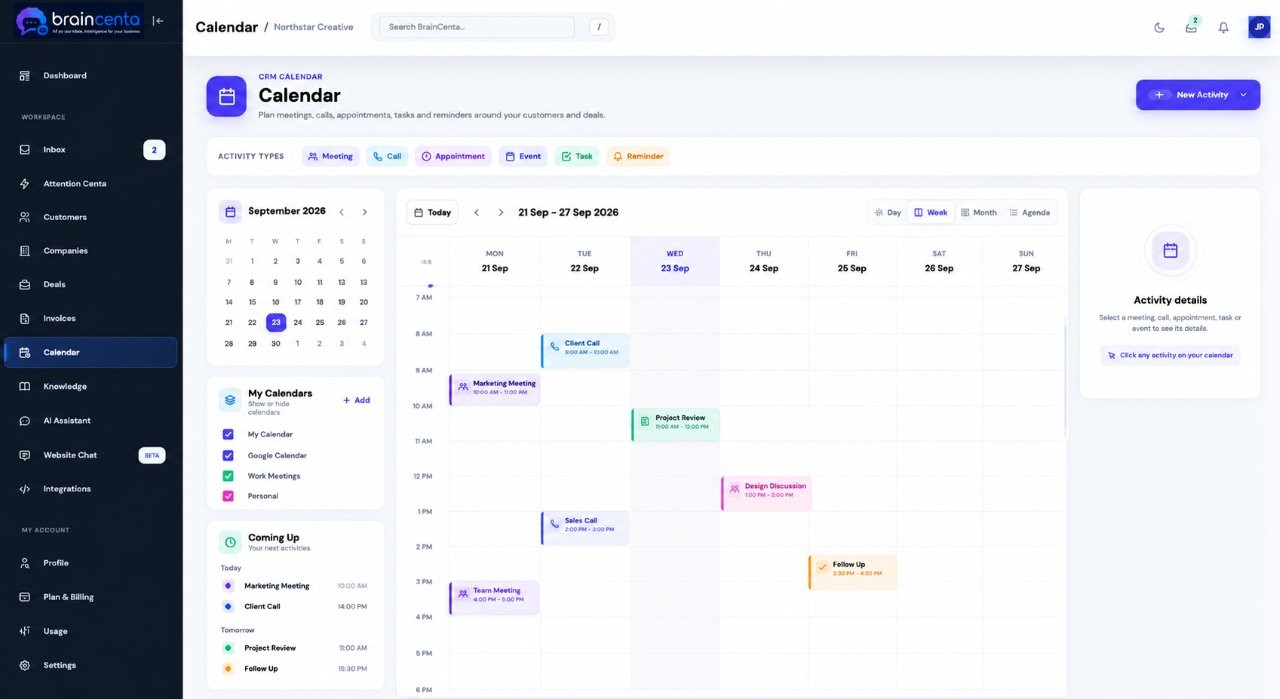
Connected to your schedule and your customers.
See your booked meetings, calls and follow-ups together. BrainCenta gives you a clearer picture of the day and the customers, companies and deals behind it.
Connect Google Calendar to BrainCenta and see your meetings alongside the rest of your customer work. If you use Calendly, send your booking link as usual. Once Calendly adds the confirmed event to your connected Google Calendar, it appears in BrainCenta.
“Happy to talk through the project. Choose a time that suits you.”
Choose a time on CalendlyThursday, 10:30 am · Confirmed booking
Illustrative flow. Calendly must add the booking to the Google Calendar connected to BrainCenta.
Create a meeting, invite guests and add a Google Meet link when you need one. For a phone call, schedule the time and record what you need to cover. Add a reminder so the next conversation does not slip by.
Illustrative meeting setup
You can also schedule a phone call without adding a video link.
Phone call · Morgan Lee · Harbor Studio
Ask about launch timing, the website scope and who will approve the final proposal.
Link your meeting to the customer, company or deal behind it. Keep the agenda in your notes, set a reminder and see the follow-up alongside the relationship you are building.
See the meetings you have booked, prepare with the right customer context and make time for the next conversation.